> For the complete documentation index, see [llms.txt](https://help.felt.com/llms.txt). Markdown versions of documentation pages are available by appending `.md` to page URLs; this page is available as [Markdown](https://help.felt.com/styling/number-formatting.md).
# Number formatting
Format numbers as currency, percentages, distances, or areas. Set decimals and units, or write custom numbro.js formats.
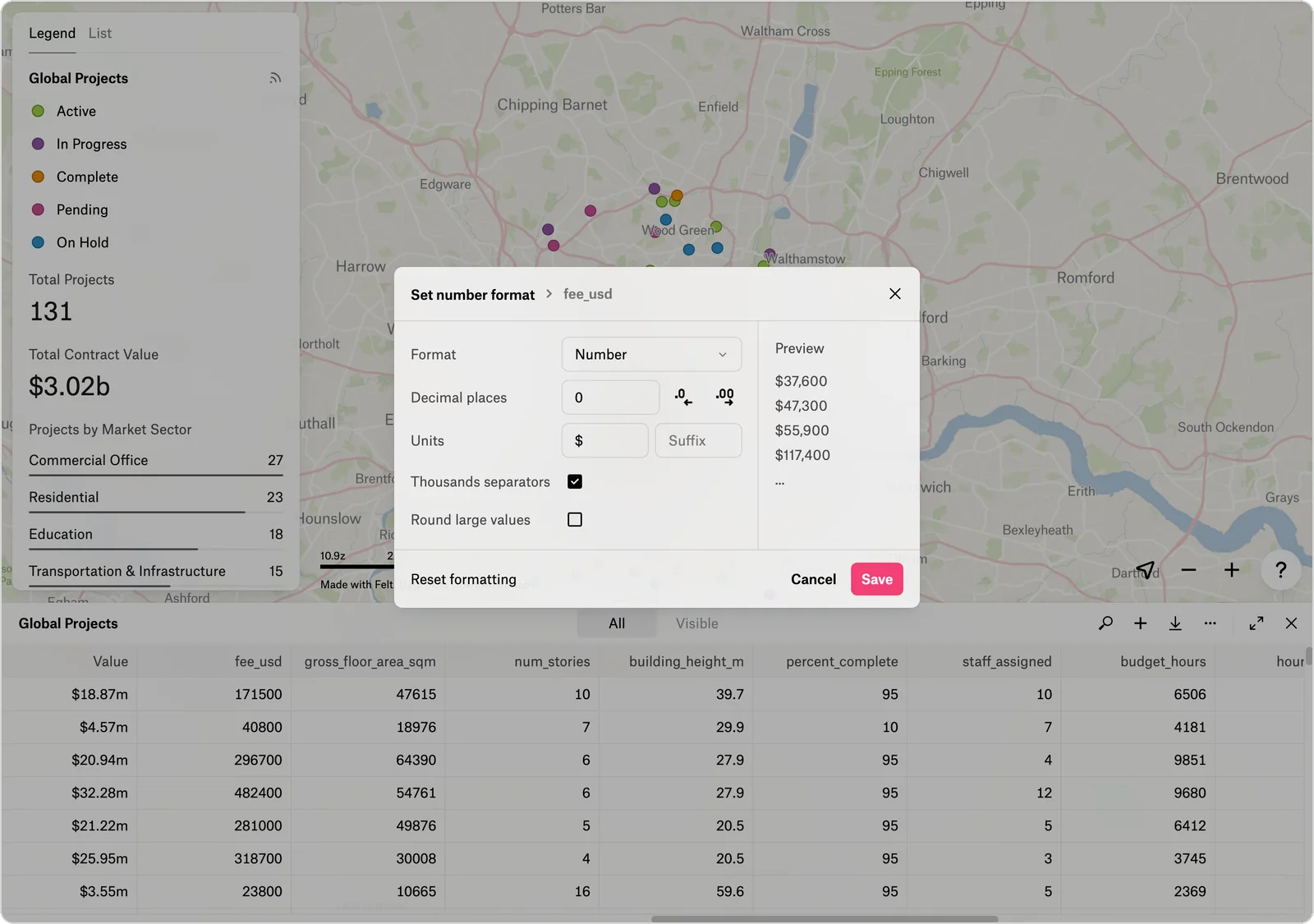
Number formatting changes how an attribute's values appear, such as `$1,234,567` instead of `1234567`, without changing the stored values. One format applies to the attribute in the [table](/tools/table.md), [popups](/styling/popups.md), [dashboard components](/analysis-and-dashboards/dashboards.md), and [labels](/styling/labels.md).
To show currency with thousands separators and no decimals:
1. Click **Edit map** in the toolbar at the top right of the map.
2. Click **Open table** in the toolbar, or press **T**.
3. Click the column name and click **Format**. The **Set number format** dialog opens.
4. Set **Format** to **Number**, **Decimal places** to `0`, and the **Units** **Prefix** to your currency symbol, such as `$`.
5. Turn on **Thousands separators** and click **Save**. A value of `31200000` shows as `$31,200,000`.
You can also open the dialog from a popup's **Popup content** panel (hover over an attribute and click **Format**) or from a dashboard component's **Format** setting.
## Format options
In the **Set number format** dialog, **Preview** shows the result as you change the settings.
| Setting | What it does |
| ------------------------ | --------------------------------------------------------------------------------------------------------------------------------------------------- |
| **Format** | **Number**, **Percent** (multiplies by 100 and adds %), **Distance** or **Area** (for Felt's Length, Perimeter, and Area attributes), or **Custom** |
| **Decimal places** | The digits after the decimal point |
| **Units** | Text before the number (**Prefix**) or after it (**Suffix**), such as `$` or `km` |
| **Thousands separators** | Commas between thousands, such as 34,500 |
| **Round large values** | Shortens large numbers, such as 1.2m for 1,200,000. Unavailable with **Percent**. |
Distance offers Meters, Kilometers, Feet, and Miles, and Area offers Square meters, Hectares, Square kilometers, Square feet, Acres, and Square miles. **Automatic** picks a unit for each value.
## Custom formats
A custom number format uses [numbro.js](https://numbrojs.com/format.html) syntax, written as JSON, for formats the other options don't cover, such as ordinals, times, or byte sizes. In the **Set number format** dialog, set **Format** to **Custom** and enter the format. The **Preview** shows the result or an error. The Custom format has no **Prefix** field. To use a currency symbol other than `$`, select the **Number** format.
| Input value | Format | Output |
| ----------- | ------------------------------------------------------------------------- | ------------- |
| 10000.23 | `{ "thousandSeparated": true }` | 10,000.23 |
| 10000.23 | `{ "thousandSeparated": true, "forceSign": true }` | +10,000.23 |
| -10000 | `{ "thousandSeparated": true, "negative": "parenthesis", "mantissa": 4 }` | (10,000.0000) |
| 1.23456 | `{ "trimMantissa": true, "mantissa": 4 }` | 1.2346 |
| 31200000 | `{ "output": "currency", "thousandSeparated": true, "mantissa": 0 }` | $31,200,000 |
| 1230974 | `{ "average": true, "mantissa": 1 }` | 1.2m |
| 1234567891 | `{ "average": true, "totalLength": 3 }` | 1.23b |
| 23 | `{ "output": "ordinal" }` | 23rd |
| 0.974878234 | `{ "output": "percent", "mantissa": 4 }` | 97.4878% |
| 238 | `{ "output": "time" }` | 0:03:58 |
| 2048 | `{ "output": "byte", "base": "binary", "spaceSeparated": true }` | 2 KiB |
## Frequently asked questions
Why doesn't my label match the table's formatting?
Labels, popups, and the table share one format per attribute, so they match. A label built with a `text-field` override in the style language editor is the exception: it uses the override's own formatting. See [Combine attributes in a label](/styling/advanced-styling-fsl.md#combine-attributes-in-a-label).
---
# Agent Instructions
This documentation is published with GitBook. GitBook is the documentation platform designed so that both humans and AI agents can read, navigate, and reason over technical content effectively. Learn more at gitbook.com.
## Querying This Documentation
If you need additional information that is not directly available in this page, you can query the documentation by asking a question.
Perform an HTTP GET request on the following URL with the `ask` and `goal` query parameters:
```
GET https://help.felt.com/styling/number-formatting.md?ask=&goal=
```
`ask` is the immediate question: it should be specific, self-contained, and written in natural language.
`goal` is what the user is ultimately trying to achieve, the reason they need the answer. Sharing it helps GitBook give you a better, more relevant answer. A goal is most helpful when it describes the outcome the user wants rather than restating the question. For example, with `ask=how do I create an API token`, a goal like `automate deployments from our CI pipeline` lets GitBook tailor the answer to that use case.
The response will contain a direct answer to the question and relevant excerpts and sources from the documentation.
Use this mechanism when the answer is not explicitly present in the current page, you need clarification or additional context, or you want to retrieve related documentation sections.